Thursday, March 17, 2016

Root Samsung, Motorola Mobile Devices

Root Samsung, Motorola Mobile Devices

Hello guys,
                I am again with new articles on rooting of Android Devices. Please follow correct procedure to make the mobile device root. I am not responsible if any failure/bad happen.
I gone through one video and thought to create the document for you all.



Important Note:


This method is 100% free!If something go wrong, or if you want to UNROOT your Samsung Galaxy S5 Neo G903F you must restore the original firmware with Samsung Kies 3.In this demo author rooted Samsung Galaxy S5 Neo G903F (Android 5.1.1) with Odin and CF-Auto-Root file

LINKS

Here is the link to CF-Auto-Root download page:https://autoroot.chainfire.eu/Here is the link to download the Odin software and the root filehttps://onedrive.live.com/redir?resid...How to enter in Download Mode on Samsung Galaxy S5 Neo https://www.youtube.com/watch?v=2i0qW...How to enable Developer Options on Samsung Galaxy S5 Neo https://www.youtube.com/watch?v=YDovb...Samsung Galaxy S5 Neo hard reset https://www.youtube.com/watch?v=UYodn...

PLEASE READ

Warning! You do this at your own risk! Make sure your phone battery is fully charged!Better remove the SIM card and memory SD card from your phone before this operation!If you reset or update your phone, all your data may be lost, so it's good to do a full backup before!

Follow the Steps:

To root your phone you need a PC with internet connection, a micro USB data cable, Odin software and the CF-Auto-Root file.

You need to enable Developer Options and turn on OEM unlocking and USB Debugging mode.


Go to google.com and search for “CF-Auto-Root” and select the url: https://autoroot.chainfire.eu/
Select the model number of mobile and download Odin file.


Once you download the file extract it and run it.

Similarly power off your mobile and press volume down button + power button+ menu button for a second till you get the screen windows like shown in image below:


Import Odin Root file image on application and connect the mobile to PC Via USB cable to proceed.

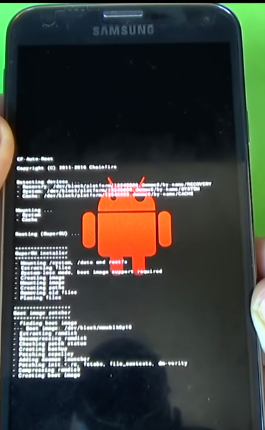

Once it will done simply click on start and you will see the progress of rooting like whown below:


once finish it automatically reboot the mobile and start to load application (super su ).
then go and check for super su and root checker application installed on you mobile. this confirm your mobile successfully rooted.

Youtube video for your reference:


Guys in case any problem please leave comment below else contact me.

Like, comment and follow my Blog.

HTTP Enumeration Using Nikto

Hello All,
      Here I am again for you with new article on HTTP enumeration using Nikto.
Enumeration is pre-phase of hacking cycle where attacker tries to gather more and more information about the target.
What is Nikto?
    Nikto is an Open Source (GPL) web server scanner which performs comprehensive tests against web servers for multiple items, including over 6400 potentially dangerous files/CGIs, checks for outdated versions of over 1200 servers, and version specific problems on over 270 servers.


 Steps:
1. From a BackTrack shell, type the following (only type what's in bold):
user1@bt:~#cd /pentest/scanners/niktouser1@bt:~#pwd
Syntax breakdown:
cd /pentest/passwords/nikto
: change into the directory 

/pentest/passwords/nikto
pwd
: program name to print current directory


2. Update the Nikto databases and plugins from cirt.net by typing the following (only type what's in bold):

user1@bt:~#./nikto.pl -update
Syntax breakdown:
./nikto.pl: PERL script to run
-update: program option to update Nikto databases and plugins


3. Run the Nikto PERL script to scan a Windows target web server (only type what's in bold, on one line):

user1@bt:~#./nikto.pl -h win_target_IP_address > /root/ceh/nikto_win_scan
Syntax breakdown:
./nikto.pl: PERL script to run


-h win_target_IP_address: the IP address of the Windows target system
> /root/ceh/nikto_win_scan: redirect the output to a file called nikto_win_scan in the /root/ceh directory


4. Examine your results:
user1@bt:~#cat /root/ceh/nikto_win_scan | less

5. Record your results:


6. Repeat step #3 using your UNIX target IP address (only type what's in bold, on one line):

user1@bt:~#./nikto.pl -h unix_target_IP_address > /root/ceh/nikto_unix_scan

7. Examine your results:

user1@bt:~#cat /root/ceh/nikto_unix_scan | less

8. Record your results:


in case more details require/doubt feel free contact me.

More To refer:  Banner Grabbing using Telnet

Learn PHP in 30 Minutes

Hello Guys,
          Here I am again for you with new articles those who is looking to learn programming.
while surfing on the internet i came across article about Learn PHP in 30 minutes. I thought to share the video with you.


What is PHP?

The PHP Hypertext Preprocessor (PHP) is a programming language that allows web developers to create dynamic content that interacts with databases. PHP is basically used for developing web based software applications.
PHP is a server-side scripting language designed for web development but also used as a general-purpose programming language. Originally created by Rasmus Lerdorf in 1994, the PHP reference implementation is now produced by The PHP Group. While PHP originally stood for Personal Home Page, it now stands for the recursive backronym PHP: Hypertext Preprocessor.
pre-requisite before to start learn php need to setup the environment for PHP. If you are on Windows, just download and Install XAMPP or WAMP Server.


In case any doubt put the comment else contact me.

WhatsApp Trick 1 | How to Hide Private Stuff without Application.

Hello Guys,
           I have observed most of the time bachelors have one questions about how to hack WhatsApp which is the most popular chatting application which is acquire by Facebook Inc.

I thought to share one trick with you all to hide files/video/music/ pics etc without 3rd party application..


Tips:
I have studied application functionality which are available in Google play which claims to hide pics and videos. 
The application directly change the extension of the files e.g. test.jpg to xcdsc.jdw (most of the application use their own extension to hide apps from Gallery and from Search.)

Simple trick go to file Manager. in setting there is options to show/hide directories. we will make a use of it.

Steps:
Create any folder e.g. "Whatsapp" put all your private stuff which you want to hide from anyone (especially from Mom/Dad/Bro/Sis/Friends).

Search it or go to Gallery.  yes of course it will be visible.

Now do little change in the folder name "WhatsApp" to ".WhatsApp"
I have only added "." (dot) before the folder name.

Now you are not able to get the folder in Gallery.

Reason:

WhatsApp treat this type of file as system file and hide it from normal user view. to unhide you have to go to file manager and apply the setting "show/hide directory" to view it.

Its Done.

Please comment on the article and in case any difficulties contact me to get it done.

Monday, March 14, 2016

Root Android Devices with Rootx


ROOTx
The ROOTx App can root almost any android at no cost or any installation of new roms !!


Instruction to root the device

  • Plug your phone via USB Cable
  • Turn on your device
  • Allow unsigned programs
  • Enable USB debugging and Choose an
  • Choose an Option Below
  • Type it in and hit enter Twice :)


Compatible Mobile Devices:


  1. SAMSUNG GALAXY Y,Y DUOS AND ALL SGY MODELS
  2. HTC (ONLY AFTER S-OFF AND GOLDCARD)
  3. SAMSUNG GALAXY S SERIES
  4. SONY EXPERIA Z, J, L (REST NOT TESTED)( unlocked bootloader only)
  5. SAMSUNG ACE,ACE DUOS
  6. KARBONN A5,A7,A7+
  7. ALL MICROMAX ANDROID MODELS(Bootloader unlocked)
  8. SWIPE TABLETS AND PHABLET (X74,X74S,HALO,AND ALL OTHERS)
  9. Micromax bolt series(boot loader unlocked)
  10. Samsung gt I5510/I550
  11. Samsung galaxy Note/Note 2
  12. Samsung Galaxy S4 (All Ee locked and us simlocked are supported!!) (New tested)
  13. Samsung galaxy Grand/Spica
  14. Samsung gt 551/t-red versions too (vietnamese)
  15. MID Generic tablets (all versions)
  16. DIFRNCE DIT4350
  17. Karbonn A12, A15, A21, A30
  18. fake galaxy s1,2,3,4 ( MKT DEVICES )
  19. Karbonn Smart Tab 1,7,8,10
  20. ( smart tab 2 is bootlocked with new firmware  )
  21. FPT F8, KTouch w619 , Karbonn A5
  22. Galaxy Note 800
  23. Magicon MNote
  24. Old XOLO FIRMWARES ( devices before A500 )
  25. Sky Vega Racer IM-a770k ICS
  26. Sky Vega Racer IM-a760k ICS
  27. Pyle Astro PTBL92BC
  28. Audiosonic 7? Quad Core T7-QC Tablet

Original Thread:
http://forum.xda-developers.com/showthread.php?t=2239958


Download Rootx

Wednesday, March 9, 2016

Banner Grabbing Using Telnet Command

Hello Guys,
           Here I am again with new article. Today I well known you about the Banner Grabbing Techniques which attacker used to gather information about the target Web servers.

There is tried & true manual technique is available for enumerating the banners and application information.

Banner grabbing is a technique used to glean information about a computer system on a network and the services running on its open ports

e.g.


[root@prober] nc www.targethost.com 80
HEAD / HTTP/1.1

HTTP/1.1 200 OK
Date: Mon, 11 May 2009 22:10:40 EST
Server: Apache/2.0.46 (Unix)  (Red Hat/Linux)
Last-Modified: Thu, 16 Apr 2009 11:20:14 PST
ETag: "1986-69b-123a4bc6"
Accept-Ranges: bytes
Content-Length: 1110
Connection: close
Content-Type: text/html

In this exercise we will make a use of "Telnet" connection to various TCP ports on target system & record banner information that is presented.

Demo 1: Banner Grabbing Using Telnet.

1. from your Kali Linux, open a shell & type following commands

root@kali:~ telnet Target_IP 80 (hit enter few times)

2. what web server application running on the target.
3. Repeat the step 1 again for known port numbers to check the services running.
4. record your result.


HTTP Commands for banner grabbing

1. Connect using telnet and type: HEAD / HTTP/1.0

telnet www.test.com 80

Trying 100.100.100.100...
Connected to www.test.com.
Escape character is '^]'.
HEAD / HTTP/1.1


  HTTP/1.1 200 OK
Cache-Control: private
Content-Length: 1768
Content-Type: text/html
Server: Microsoft-IIS/7.0
Set-Cookie: ASPSESSIONIDACBATBQQ=MJOLBPPDBKPCDFREKDMLCEOHF; path=/
X-Powered-By: ASP.NET
Date: Tue, 06 Aug 2015 03:42:18 GMT
Connection: close
Connection closed by foreign host.


 2. Let's try the option command, I like this: OPTIONS / HTTP/1.0


Trying 100.100.100.100...
Connected to www.test.com.
Escape character is '^]'.
OPTIONS / HTTP/1.1

HTTP/1.1 200 OK
Allow: OPTIONS, TRACE, GET, HEAD, POST
Server: Microsoft-IIS/7.5
Public: OPTIONS, TRACE, GET, HEAD, POST
X-Powered-By: ASP.NET
Date: Tue, 26 Aug 2015 05:47:39 GMT
Connection: close
Content-Length: 0
Connection closed by foreign host.


Error if  I type wrong commands(lower case letters):

Trying 100.100.100.100...
Connected to www.test.com.
Escape character is '^]'.

options / http/1.1      ---- I typed lower case

HTTP/1.1 400 Bad Request
Content-Type: text/html; charset=us-ascii
Server: Microsoft-HTTPAPI/2.0
Date: Tue, 26 Aug 2015 05:50:08 GMT
Connection: close
Content-Length: 311
<!DOCTYPE HTML PUBLIC "-//W3C//DTD HTML 4.01//EN""http://www.w3.org/TR/html4/strict.dtd">
<HTML><HEAD><TITLE>Bad Request</TITLE>
<META HTTP-EQUIV="Content-Type" Content="text/html; charset=us-ascii"></HEAD>
<BODY><h2>Bad Request</h2>
<hr><p>HTTP Error 400. The request is badly formed.</p>
</BODY></HTML>
Connection closed by foreign host.


It is basic level of Banner Grabbing without using 3rd Party Tools like netcat, nikto, ssh etc.

More To refer:

Banner Grabbing using Netcat
Active Stack Fingerprinting Using Nmap
Passive Stack Fingerprinting Using Ettercap
FTP Enumeration 
SSH Enumeration
SMTP Enumeration Using Telnet
HTTP Enumeration Using Nikto